Welcome
Welcome to the geometry of CNC machining. Every cut a CNC machine makes is a geometric operation: a point moving through space along a precisely defined path.
Before you can program a tool path, you need to understand where: and that means coordinate systems.
This lesson assumes you already know what a CNC machine is & what G-code does. If not, start with the CNC Machining: Precision Manufacturing lesson first.
MCS and WCS
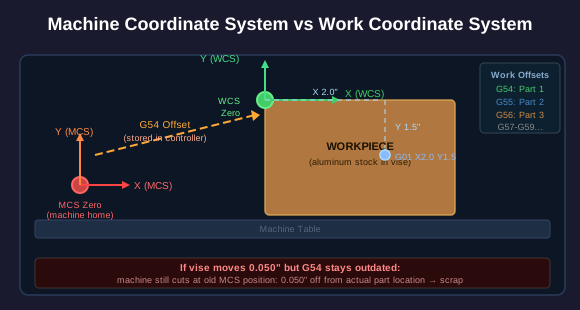
Machine Coordinate System (MCS) vs Work Coordinate System (WCS)
Every CNC machine has two coordinate systems operating simultaneously.
Machine Coordinate System (MCS): The machine's absolute reference frame. When you home the machine, the spindle moves to a fixed point (machine zero) defined by limit switches or encoders. Every position the machine can reach is defined relative to this point. The MCS never changes: it is built into the hardware.
Work Coordinate System (WCS): Your chosen reference frame for programming the part. You pick a convenient point on the workpiece (often a corner or the center of a feature) and tell the machine: 'This is my zero.' All G-code coordinates are relative to this point.
G54 through G59 are six work coordinate offsets stored in the controller. Each one says: 'WCS zero is located at this MCS position.' G54 is the default. If you have multiple parts fixtured on the table, you might use G54 for the first part, G55 for the second, and G56 for the third: same program, different offsets.
When you 'touch off' a part, you are measuring the MCS position of the workpiece origin & storing it in a G54-G59 register. If the vise moves, the offsets must be updated.
Right-Hand Rule
Axis Orientation: The Right-Hand Rule
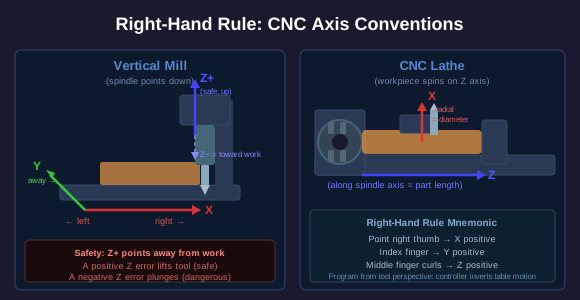
CNC machines follow a universal convention for axis directions. Point your right thumb in the positive X direction, your index finger in positive Y, & your middle finger curls toward positive Z.
On a vertical mill (spindle points down):
- X = left / right (table moves)
- Y = toward you / away from you (table moves)
- Z = up / down (spindle moves): Z positive is AWAY from the workpiece
On a lathe, the convention is different:
- Z = along the spindle axis (length of the part)
- X = perpendicular to Z (radial direction: controls diameter)
Important inversion: In G-code, you program as if the tool moves and the part is stationary. On many machines, the opposite happens physically: the table moves while the spindle stays in X and Y. The machine controller handles the inversion. You always program from the tool's perspective.
Tool Length Offsets
Tool Length Offsets (H Codes)
Different tools have different lengths. A 2-inch end mill sticks out further from the spindle than a center drill. If you swap tools and do not account for the length difference, the Z coordinates will be wrong: potentially catastrophically wrong.
Tool Length Offset (TLO): A value stored in the controller for each tool. It tells the machine how far the tool tip is from the spindle gauge line (a reference point on the spindle). When you call G43 H01, the controller adds tool 1's length offset to all Z moves.
Without TLO, you would have to re-touch-off Z every time you change tools. With TLO, you touch off once with a reference tool, measure all other tools relative to that reference, & the controller does the math.
G43 = Apply tool length offset (positive direction: adds the offset)
G49 = Cancel tool length offset
H code = Which tool's offset to use (H01, H02, etc.)
Linear and Circular Interpolation
How the Controller Moves the Tool
G-code defines two fundamental types of motion:
G01: Linear Interpolation: The tool moves in a straight line from its current position to the target position. The controller coordinates the X, Y, and Z motors so they all arrive at the endpoint simultaneously. G01 X2.0 Y1.0 Z-0.5 draws a straight line in 3D space.
G02 / G03: Circular Interpolation: The tool moves along a circular arc.
- G02 = clockwise arc
- G03 = counterclockwise arc
Arcs can be defined two ways:
- Radius format: G02 X2.0 Y1.0 R0.5: move to (2.0, 1.0) along an arc with radius 0.5
- Center format: G02 X2.0 Y1.0 I0.5 J0.0: I and J give the incremental distance from the current position to the arc center. This format is unambiguous and preferred for precision work.
Inside the controller, even circular arcs are broken into tiny straight-line segments (micro-line interpolation). The controller calculates hundreds or thousands of intermediate points & sends step-&-direction pulses to the motors. The resolution is so fine that the resulting motion looks & measures as a smooth curve.
Climb vs Conventional Milling
Climb Milling vs Conventional Milling
The geometry of how the cutter engages the material matters enormously for surface finish, tool life, & cutting forces.
Conventional (Up) Milling: The cutter rotates against the direction of feed. Each tooth enters the material at zero chip thickness and exits at maximum thickness. The cutter tends to push away from the work initially, then grab and pull. This creates more heat (the tooth rubs before it cuts) and a rougher surface finish.
Climb (Down) Milling: The cutter rotates with the direction of feed. Each tooth enters at maximum chip thickness and exits at minimum. The cutter immediately bites into material and pushes the work downward into the table. This produces a better surface finish, less heat, and longer tool life.
Why not always climb mill? Climb milling pulls the workpiece into the cutter. On older manual machines without backlash compensation, this pull can cause the table to lurch forward & crash. CNC machines have ballscrews with minimal backlash, so climb milling is standard. But for thin or poorly fixtured parts, conventional milling may still be safer because it pushes the work away.
Tangent Arcs and Fillets
Tangent Arcs, Fillets, & Chamfers
Real parts rarely have perfectly sharp corners. They have fillets (rounded inside corners), radii (rounded outside corners), & chamfers (angled cuts that remove sharp edges).
A tangent arc is an arc that meets a straight line (or another arc) with no discontinuity in direction. At the point where the arc begins, it has the same slope as the line it connects to. This produces a smooth, continuous profile with no sudden direction changes.
Why tangent matters for machining:
- A sharp corner forces the tool to stop, change direction, & accelerate again. This leaves dwell marks (the tool sits in one spot while decelerating, burning the surface).
- A tangent arc lets the tool sweep through the transition at speed. No deceleration, no dwell marks, better surface finish.
- Stress concentrators: sharp inside corners concentrate stress & are where parts crack. Fillets distribute the stress over a curved surface.
Chamfers are simpler: a straight cut at 45 degrees (or other angle) that removes a sharp edge. Programmed with G01 moves at an angle. Chamfers are easier to machine than fillets but do not distribute stress as well.
Cutter Radius Compensation
Tool Radius Compensation (G41 / G42)
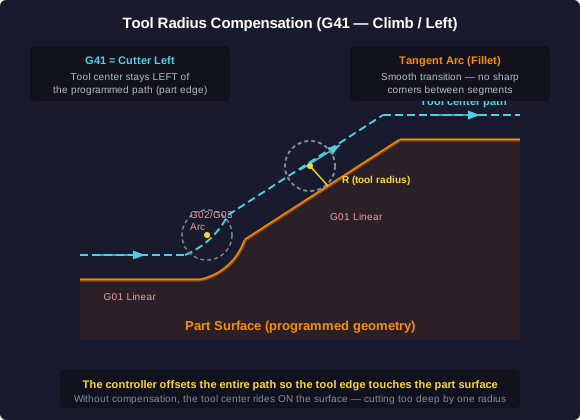
When you program a part profile, you describe the geometry of the finished part surface. But the tool has a radius: its center must follow a path that is offset from the part surface by that radius.
G41: Cutter Compensation Left: The tool center offsets to the LEFT of the programmed path (looking in the direction of travel). Used for climb milling outside profiles.
G42: Cutter Compensation Right: The tool center offsets to the RIGHT.
G40: Cancel cutter compensation.
With cutter comp active, you program the exact part geometry (the finished surface), & the controller automatically calculates the offset path for the tool center. This has two major advantages:
1. The program matches the print. Dimensions on the drawing match dimensions in the code. No manual offset calculations.
2. Tool wear adjustment. When a tool wears and cuts slightly oversize, the operator adjusts the cutter comp value in the offset table: no program edit needed. A smaller comp value pulls the tool closer to the part surface, compensating for the undersize cut.
The controller handles all the geometric complexity: offsetting straight lines, re-calculating arc radii for the offset path, & managing the transition geometry at corners.
Why GD&T Relies on Geometry
GD&T: Geometry, Not Just Dimensions
Traditional dimensioning says: 'This hole is 0.500 inches in diameter, located 2.000 inches from the left edge, plus or minus 0.005 inches.'
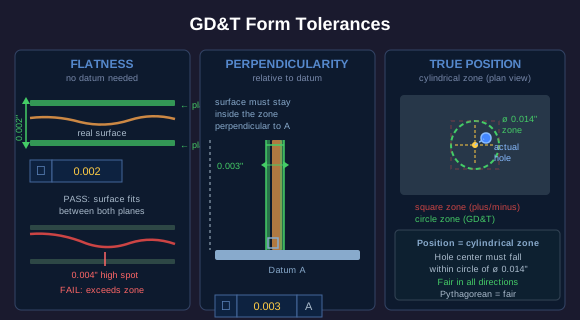
The problem: plus-or-minus tolerancing creates a square tolerance zone. The hole center must fall within a 0.010 x 0.010 inch square. But a square zone is not fair: a hole whose center is at the corner of the square (0.005 right AND 0.005 up from nominal) is actually 0.007 inches from the true position (Pythagorean theorem: the square root of 0.005 squared plus 0.005 squared). You would reject that part even though a hole at 0.007 from nominal in a single direction would pass.
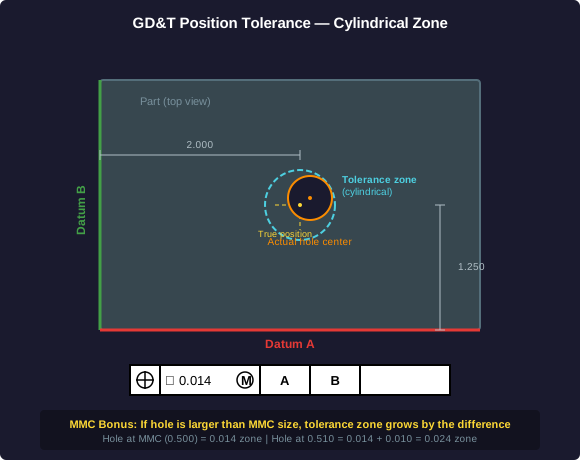
GD&T replaces the square zone with a cylindrical tolerance zone. The hole center must fall within a circle of a specified diameter around the true position. This is geometrically fair: 0.007 from nominal is 0.007 from nominal regardless of direction.
GD&T is a complete geometric language for describing how much a feature can deviate from its ideal form, orientation, and location. It uses feature control frames: those rectangular boxes with symbols you see on engineering drawings.
Form and Orientation Tolerances
Form Tolerances: Controlling Shape
Position controls where a feature is. Form tolerances control what shape it is.
Flatness: The surface must lie between two parallel planes separated by the tolerance value. If flatness is 0.002, every point on the surface must be within a 0.002-inch-tall zone between two perfectly flat, parallel planes. No datum reference needed: flatness is self-referencing.
Perpendicularity: A surface or axis must be within a tolerance zone relative to a datum (reference surface). For a surface, the zone is two parallel planes perpendicular to the datum, separated by the tolerance value. For an axis (like a hole), the zone is a cylinder perpendicular to the datum.
Concentricity: Two cylindrical features must share the same axis within a tolerance zone. The median points of one cylinder must fall within a cylindrical tolerance zone centered on the datum axis. Concentricity is expensive to inspect (requires median point calculations): most shops use runout instead.
All of these are geometric controls. They define tolerance zones that are shapes (planes, cylinders, cones), not just numbers. A flatness tolerance of 0.002 is a pair of parallel planes. A position tolerance of 0.014 diameter is a cylinder. This is what makes GD&T geometric: every tolerance is a shape in space.
Machine Travel Limits
Work Envelope: The Space a Machine Can Reach
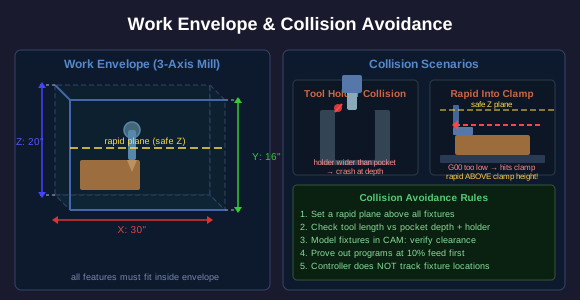
Every CNC machine has finite travel in each axis. A typical vertical machining center might have:
- X travel: 30 inches
- Y travel: 16 inches
- Z travel: 20 inches
The work envelope is the 3D volume defined by these travel limits: a rectangular box (for a 3-axis mill) or a more complex shape (for rotary-axis machines). Any feature you want to cut must fall within this envelope.
Collision avoidance is the geometry of making sure the tool, tool holder, spindle head, fixture, & workpiece do not collide during the program. The controller does not inherently know where the vise, clamps, or fixtures are. Collision avoidance is the programmer's responsibility.
Critical collision geometries:
- Tool length vs pocket depth: A long tool reaching into a deep pocket may collide the tool holder or spindle head with the part walls.
- Fixture interference: The tool path must clear clamps, parallels, & vise jaws. A rapid move (G00) across the part at the wrong Z height can drive the tool into a clamp.
- Rapid plane: Most programs define a 'rapid plane': a safe Z height above all obstructions. Rapids happen above this plane. Never rapid below it.
Rotary Axes and Geometric Freedom
4th and 5th Axis: Rotation Expands Geometry
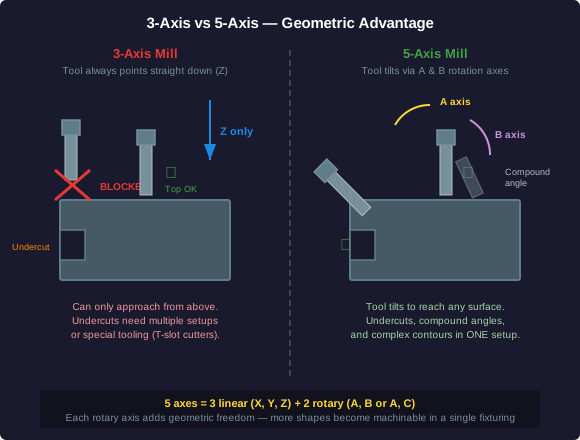
A 3-axis mill can only approach the workpiece from above (along Z). Any feature that requires access from the side or underneath requires a separate setup: flip the part, re-fixture, re-touch-off, and pray the features align.
4th axis: Adds one rotary axis (usually A, which rotates around X). The part can be turned to present different faces to the tool. A 4th axis is commonly a rotary table bolted to the mill table. It lets you machine features around a cylinder or on multiple faces without re-fixturing.
5th axis: Adds two rotary axes. The tool (or the table) can tilt in two independent rotational directions. This means the tool can approach from virtually any angle.
What 5-axis makes geometrically possible that 3-axis cannot:
- Undercuts: Features that are hidden from a top-down view. The tool tilts to reach behind overhanging geometry.
- Compound angles: Surfaces that are not parallel or perpendicular to any axis. A 3-axis machine would need a custom angled fixture. A 5-axis machine just tilts.
- Impellers and turbine blades: Twisted, curved surfaces that change angle continuously. Only 5-axis simultaneous machining can cut these in one setup.
- Reduced setups: A part that requires six setups on a 3-axis machine might need one setup on a 5-axis machine. Each setup is a chance for alignment error.
Summary
Geometry of CNC Machining: Key Takeaways
Coordinate systems: MCS is the machine's absolute frame. WCS (G54-G59) is your reference frame for the part. The right-hand rule defines axis directions. Tool length offsets compensate for different tool lengths.
Tool paths: G01 moves in straight lines. G02/G03 move in arcs. I/J center format eliminates the two-arc ambiguity of radius format. Climb milling (cutter rotation with feed direction) gives better surface finish and tool life.
Arcs and profiles: Tangent arcs create smooth transitions without dwell marks. The minimum inside fillet radius equals the tool radius. Cutter compensation (G41/G42) lets you program the part geometry while the controller offsets the tool path.
GD&T: Geometric tolerances define tolerance zones as shapes (cylinders, planes). Position tolerance zones are circular, not square: geometrically fair. MMC bonus tolerance reflects real assembly clearance. Flatness and perpendicularity control form independently of dimensions.
Work envelope: Every machine has finite travel. Rotary axes (4th and 5th) expand what geometry is reachable and reduce setups. Fewer setups mean tighter feature-to-feature tolerances because all features share the same WCS origin.
The geometry is the foundation. Every G-code command, every tolerance callout, every fixture decision is a geometric operation. Master the geometry, & the machining follows.