Welcome
Welcome to robotics: the engineering discipline where mechanics, electronics, and software converge to build machines that sense, decide, and act.
The word robot comes from the Czech word robota, meaning forced labor. Karel Capek coined it in a 1920 play. A century later, robots weld cars, explore Mars, perform surgery, & vacuum living rooms.
Not every automated machine is a robot. A toaster has automation: it heats and pops: but it cannot sense its environment or adapt. A robot has three essential capabilities:
- Sense: gather information about the world through sensors
- Decide: process that information and choose an action
- Act: move or manipulate the physical world through actuators
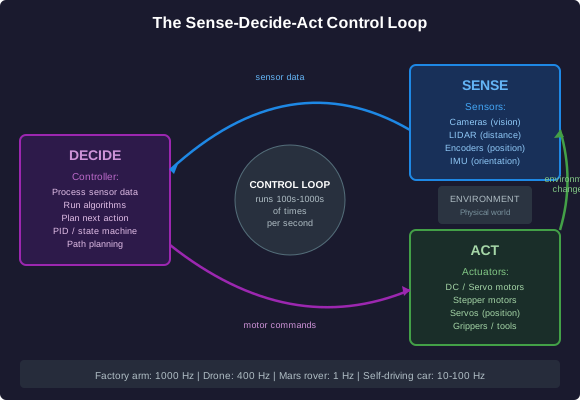
This sense-decide-act loop runs continuously. A factory arm checks its joint positions thousands of times per second. A Mars rover analyzes terrain images before each wheel command. The loop speed & complexity vary, but the structure is the same.
Robots exist on an autonomy spectrum. A teleoperated bomb-disposal robot has zero autonomy: a human makes every decision. A warehouse robot that navigates aisles and avoids obstacles has partial autonomy. A self-driving car aims for full autonomy, though that remains an open engineering challenge.
The major categories of robots:
- Industrial robots: fixed-base arms that weld, paint, assemble, and palletize in factories
- Service robots: assist humans in non-manufacturing settings: surgical robots, delivery robots, cleaning robots
- Mobile robots: move through the world: wheeled, legged, tracked, aerial (drones), and underwater (ROVs and AUVs)
This lesson covers the core building blocks every roboticist needs to understand: actuators, sensors, control systems, programming concepts, & career paths.
Warm-Up
Quick Check-In
Let us see where you start from.
Motors and Movement
Actuators: How Robots Move
An actuator is any device that converts energy into physical motion. Actuators are the muscles of a robot.
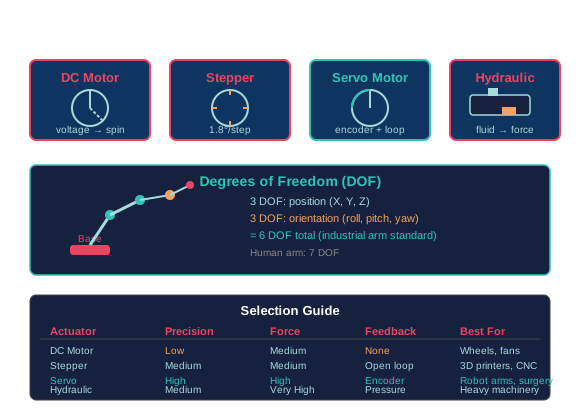
DC Motors: The simplest electric motor. Apply voltage, the shaft spins. Reverse the voltage, it spins the other way. Speed is proportional to voltage. DC motors are cheap and fast, but they have no built-in way to know their position. They are common in wheeled robots and simple mechanisms.
Stepper Motors: Move in discrete steps, typically 1.8 degrees per step (200 steps per revolution). You command a specific number of steps, and the motor moves exactly that far. Steppers give precise open-loop position control without a sensor, but they can miss steps under heavy load. Common in 3D printers, CNC routers, and camera gimbals.
Servo Motors: A motor combined with a position sensor (encoder) and a controller in a closed-loop system. The controller continuously compares the commanded position to the actual position and corrects any error. Servos offer the best combination of speed, torque, and precision. Industrial robot arms almost exclusively use servo motors.
Pneumatic Actuators: Use compressed air to create linear or rotary motion. Fast and powerful for their size, but hard to control precisely because air is compressible. Common in factory grippers and pick-and-place machines.
Hydraulic Actuators: Use pressurized fluid (oil) instead of air. Because fluid is nearly incompressible, hydraulics deliver enormous force with precise control. Heavy construction equipment, large industrial presses, and some legged robots (like Boston Dynamics' early Atlas) use hydraulics. The tradeoff is weight, complexity, and the risk of fluid leaks.
Degrees of Freedom (DOF): Each independent axis of motion is one degree of freedom. A typical industrial robot arm has 6 DOF: three for positioning the end effector in space (X, Y, Z) and three for orienting it (roll, pitch, yaw). A human arm has 7 DOF. More degrees of freedom means more flexibility but more complexity in control and programming.
Choosing the Right Actuator
Matching Actuators to the Task
Choosing the right actuator requires understanding the application requirements: speed, precision, force, & environment.
How Robots Perceive the World
Sensors: The Robot's Senses
Without sensors, a robot is blind & deaf. Sensors provide the raw data that drives every decision.
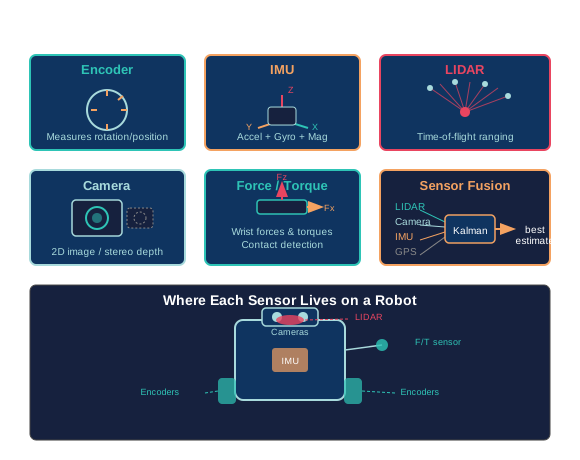
Encoders: Measure rotation. An optical encoder has a disk with slots; a light shines through and a detector counts pulses as the disk spins. This tells the controller exactly how far a joint has moved. Incremental encoders count relative motion; absolute encoders report the exact angle at power-up. Every servo motor has an encoder.
IMUs (Inertial Measurement Units): Combine accelerometers (measure linear acceleration), gyroscopes (measure rotational velocity), and sometimes magnetometers (measure magnetic heading). An IMU tells the robot its orientation and how it is moving through space. Critical for drones, legged robots, and any mobile platform that needs to stay balanced.
LIDAR (Light Detection and Ranging): Fires laser pulses and measures the time for each pulse to bounce back. This creates a detailed 2D or 3D map of the surroundings. Self-driving cars and warehouse robots use LIDAR for obstacle detection and mapping. A spinning LIDAR can produce hundreds of thousands of distance measurements per second.
Cameras: Provide rich visual data but require significant computation to interpret. A single camera gives a 2D image; stereo cameras (two cameras with known separation) provide depth information. Computer vision algorithms process camera data for object recognition, line following, and visual SLAM (Simultaneous Localization and Mapping).
Force/Torque Sensors: Measure the forces and torques applied at a point, typically at the robot's wrist or end effector. Essential for tasks requiring controlled contact: assembly (inserting a pin into a hole), polishing, and collaborative robots that must detect contact with a human and stop immediately.
Sensor Fusion: No single sensor is perfect. LIDAR gives precise distance but no color. Cameras give rich images but struggle in darkness. IMUs drift over time. Sensor fusion combines data from multiple sensors to produce a more accurate and reliable picture than any sensor alone. A self-driving car fuses LIDAR, cameras, radar, GPS, and IMU data continuously.
Selecting Sensors for a Task
Matching Sensors to the Mission
Sensor selection depends on what the robot needs to know, the environment, & the computational budget.
Open Loop vs Closed Loop
Control: Making Robots Behave
A robot without control is just a collection of parts. Control systems are the decision-making layer: they take sensor data and compute the commands that drive the actuators.
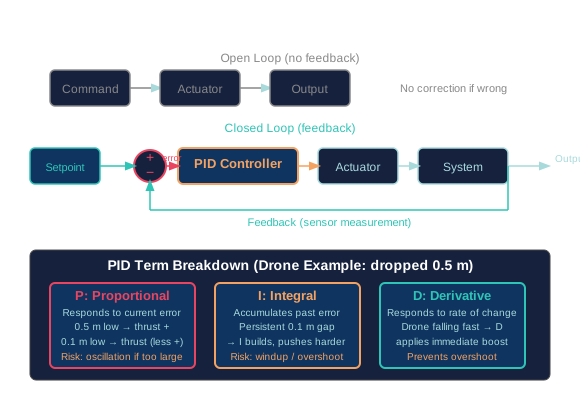
Open-Loop Control: Send a command and hope for the best. A stepper motor commanded to take 200 steps will try, but if it misses a step under load, nothing detects the error. Open-loop is simple and cheap, but it cannot correct for disturbances. A microwave oven is open-loop: it runs for the time you set, regardless of whether the food is actually hot.
Closed-Loop Control: Measure the output, compare it to the desired value, and correct the difference. This is feedback control, and it is the foundation of all serious robotics. A servo motor is closed-loop: the encoder measures actual position, the controller compares it to the commanded position, and adjusts the motor voltage to close the gap.
PID Control: The most widely used feedback controller. PID stands for Proportional-Integral-Derivative.
- P (Proportional): The correction is proportional to the current error. Big error, big correction. But P alone often overshoots or settles with a small persistent error.
- I (Integral): Accumulates past error over time. If the system has been slightly off for a while, I builds up & pushes harder. This eliminates steady-state error but can cause oscillation if set too high.
- D (Derivative): Responds to how fast the error is changing. If the error is shrinking quickly (the system is approaching the target), D reduces the correction to prevent overshoot. D acts as a damper.
Tuning a PID controller: finding the right P, I, and D values: is part science and part craft. Too much P and the system oscillates. Too much I and it winds up and overshoots. Too much D and it reacts to noise. Real robots often need PID tuning for each joint.
Stability: A control system is stable if it converges to the desired state. An unstable system oscillates with increasing amplitude: the robot shakes itself apart. Stability analysis is a core skill in control engineering.
Applying Control Concepts
Thinking Like a Controls Engineer
Understanding feedback and PID is not just theory: it explains why robots behave the way they do.
State Machines and ROS
Software: The Robot's Brain
Robot software is fundamentally different from web or business software. It runs in real time, interacts with physical hardware, and must handle unexpected situations gracefully: a dropped object, a stuck joint, a human stepping into the workspace.
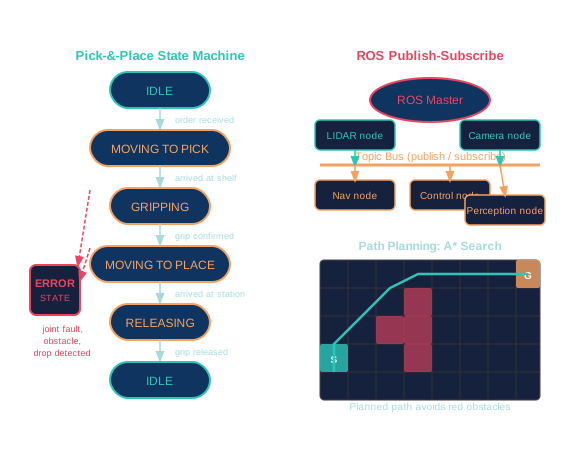
State Machines: The most common programming pattern in robotics. A state machine defines a set of states (like IDLE, MOVING, GRIPPING, ERROR) and the transitions between them. The robot is always in exactly one state. Events trigger transitions.
For example, a pick-&-place robot:
- IDLE: waiting for a command
- MOVING_TO_PICK: traveling to the pickup location
- GRIPPING: closing the gripper on the object
- MOVING_TO_PLACE: carrying the object to the destination
- RELEASING: opening the gripper
- ERROR: something went wrong (object dropped, joint fault, obstacle detected)
Each state has defined entry actions, exit actions, and transition conditions. State machines prevent the robot from doing nonsensical things: you cannot release an object you never gripped.
ROS (Robot Operating System): Not actually an operating system. ROS is a middleware framework that provides communication infrastructure, hardware abstraction, and a massive library of reusable packages. It runs on Linux. Robots built with ROS use a publish-subscribe architecture: sensor nodes publish data on topics, and control nodes subscribe to the topics they need. This modular design means you can swap a LIDAR sensor without rewriting the navigation code.
Path Planning: How a robot decides its route from point A to point B while avoiding obstacles. Simple approaches include waypoint navigation (follow a series of predefined points) and potential fields (obstacles repel, goals attract). Advanced approaches like A* and RRT (Rapidly-exploring Random Trees) search for optimal or feasible paths through complex environments. Self-driving cars replan their paths multiple times per second as the world changes.
Designing Robot Behavior
Thinking Through Robot Software
Good robot software anticipates failure & handles it gracefully.
Careers in Robotics
Building a Career in Robotics
Robotics is growing fast across manufacturing, logistics, healthcare, agriculture, & defense. Here are the major career paths.
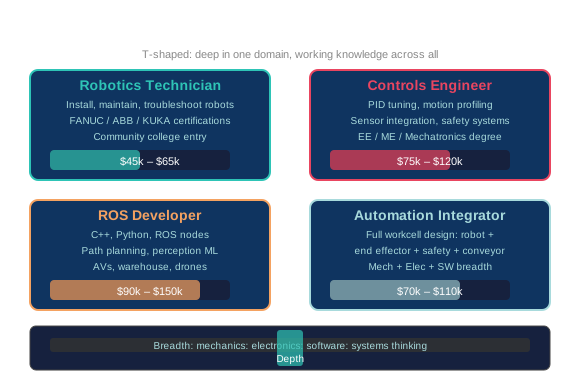
Robotics Technician: Installs, maintains, troubleshoots, and repairs robotic systems. This is the most accessible entry point. You work hands-on with the hardware: replacing motors, calibrating sensors, rewiring controllers, and diagnosing faults. Community college programs and manufacturer certifications (FANUC, ABB, KUKA) can get you started. Typical starting salary: $45,000-$65,000.
Controls Engineer: Designs and tunes the control systems that make robots behave correctly. This role requires strong math (linear algebra, differential equations) and programming skills. Controls engineers work with PID tuning, motion profiling, sensor integration, and safety systems. A bachelor's degree in electrical, mechanical, or mechatronics engineering is typical. Salary range: $75,000-$120,000.
ROS Developer / Robotics Software Engineer: Writes the software that coordinates perception, planning, and control. These developers work in C++ and Python, build ROS nodes, implement path planning algorithms, and integrate machine learning models for perception. Strong computer science skills are essential. This role is in high demand for autonomous vehicles, warehouse robots, and drone systems. Salary range: $90,000-$150,000.
Automation Integrator: Designs and implements complete robotic work cells for factories. An integrator takes a manufacturing problem (weld these two parts together at 60 units per hour), selects the robot, end effector, safety system, and conveyor, programs the whole cell, and commissions it on the factory floor. Integrators need broad knowledge across mechanical, electrical, and software. Many work for system integration companies. Salary range: $70,000-$110,000.
Other Paths: Mechanical designers who create robot structures and mechanisms. Electrical engineers who design power systems and circuit boards. Research scientists who push the boundaries of manipulation, locomotion, and machine learning for perception. Field robotics engineers who deploy robots in extreme environments: underwater, underground, or in space.
The common thread: robotics rewards people who can think across disciplines. A purely mechanical person struggles without software skills. A purely software person struggles without understanding the physics. The best roboticists are T-shaped: deep expertise in one area with working knowledge across all of them.
Your Path Forward
Reflection
You have now covered the fundamental building blocks: actuators, sensors, control systems, programming patterns, & career paths.